
How to Print a GTA 6 Poster & Leonida Map at Home (Free Multi-Page Guide)
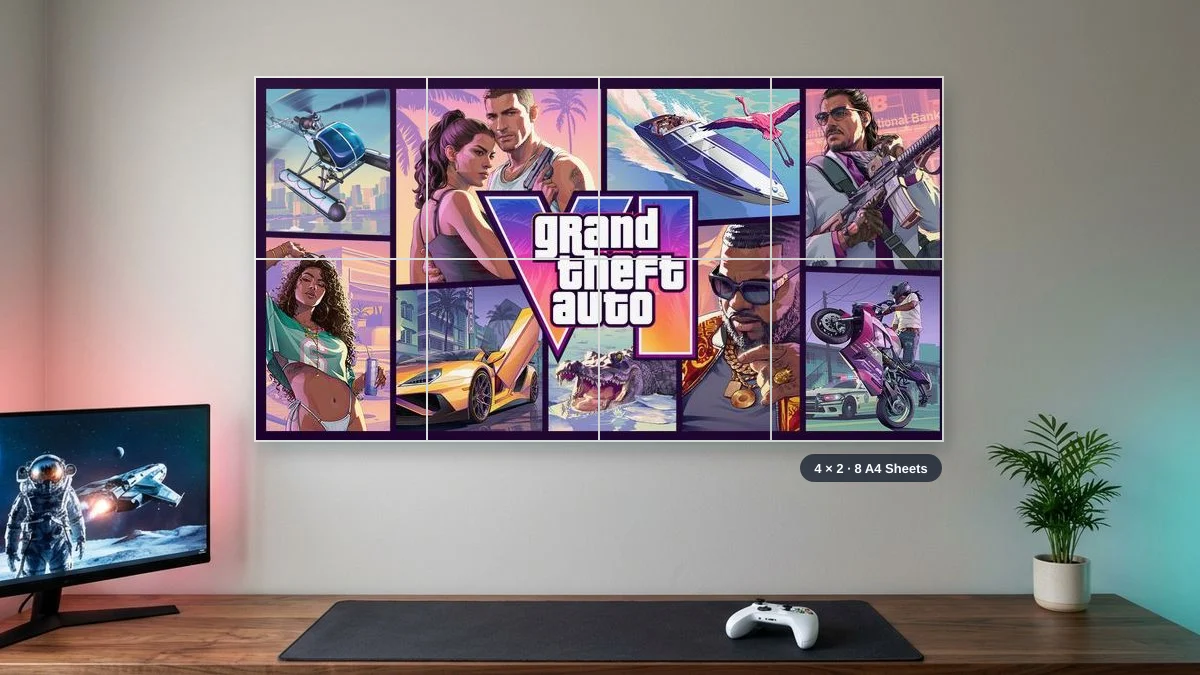
Why Print Your Own GTA 6 Poster or Leonida Map?
With Grand Theft Auto VI finally out, many players who picked up the digital version — or noticed that standard physical boxes no longer bundle a fold-out paper map — still want that classic wall poster above their setup. Instead of waiting weeks for shipping or paying $30–$80 for a custom print shop job, you can split any high-resolution GTA 6 artwork or Leonida map across standard A4 or US Letter sheets and assemble a crisp wall-sized poster in about 20 minutes.
Everything in Rasterbator.org runs 100% locally inside your browser — your downloaded artwork never leaves your computer, no account is needed, and your printable multi-page PDF (complete with crop marks, page labels, and an assembly guide) is completely free.
Step 1: Get a Clean High-Resolution Image First
Rasterbator does not host or distribute copyrighted game artwork. To get the sharpest possible print, start from an official or high-resolution source:
- Official Rockstar Artwork & Leonida Map: Visit Rockstar Games' official GTA VI portal to download official cover art, Vice City wallpapers, and high-res map assets directly.
- Check Pixel Size vs. File Size: Rasterbator handles images up to 8,192 px on the longest side without forced downscaling, and supports local files up to 40 MB (JPG, PNG, WebP, GIF, or PDF). Official 300 DPI print ZIPs can occasionally exceed 40 MB as an uncompressed JPG — if yours does, run it through our local Image Resizer (keeping the resolution while saving a fresh JPG under 40 MB) or isolate just Vice City / your favorite region with the Image Cropper.
- Verify Sharpness Before Printing: Want to double-check how large your screenshot or fan art can scale cleanly? Plug its pixel dimensions into our DPI Calculator.
Step 2: Pick the Right Grid Size for Your Wall
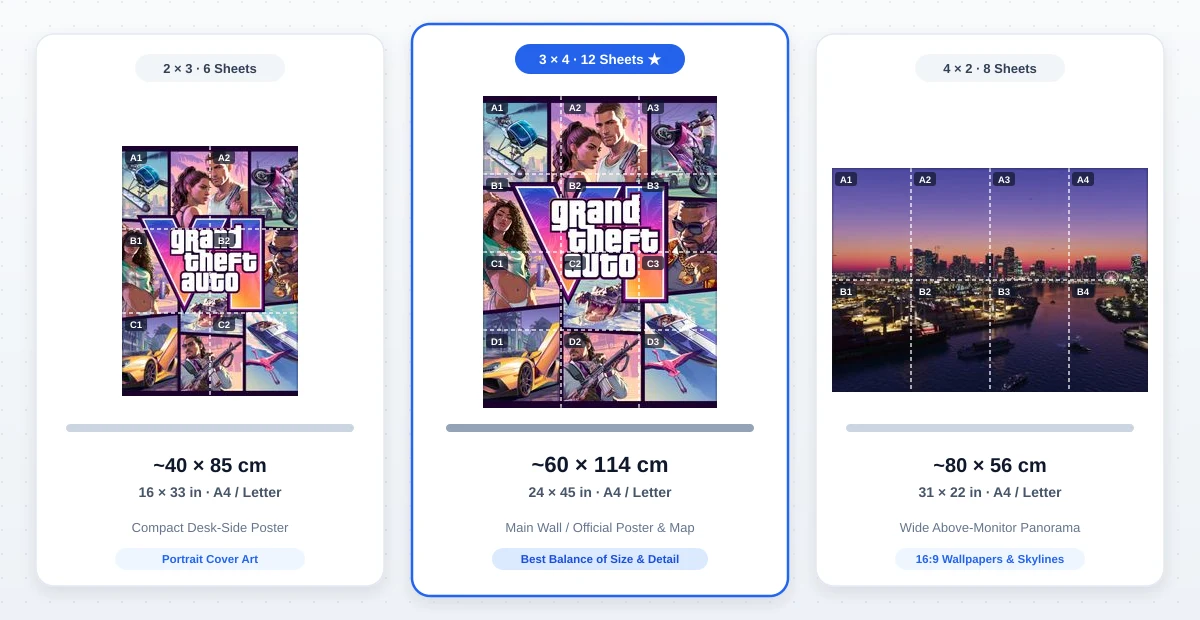
The biggest mistake beginners make is stretching a portrait cover across a square grid. Match your sheet count to the artwork's orientation — portrait grids (2×3, 3×4, 4×5) for the vertical GTA 6 cover and Leonida map, or landscape grids (4×2, 5×3) for 16:9 Vice City skyline wallpapers.
| Grid (W × H) | Sheets | Approx. A4 Size* | Approx. US Letter* | Best Use Case |
|---|---|---|---|---|
| 2 × 3 | 6 | 37 × 82 cm | 15 × 30 in | Compact vertical cover next to a monitor |
| 3 × 4 (Recommended) | 12 | 55 × 108 cm | 22.5 × 40 in | Main bedroom / gaming wall cover or map |
| 4 × 2 (Wide) | 8 | 74 × 55 cm | 30 × 20 in | 16:9 Vice City skyline or wide collage above desk |
| 4 × 5 (Giant Map) | 20 | 74 × 135 cm | 30 × 50 in | Wall-sized Leonida map with readable street names |
*Calculated with default 10 mm print margins and 8 mm overlap. Using borderless printing or 5 mm margins increases the finished size by roughly 6–10%. Need an exact wall fit? Use our Wall Planner.
Step 3: Choose the Best Style (Plain Tile vs. CMYK vs. Color Halftone)
Not every GTA 6 image should be printed the same way. Below is a real side-by-side render from Rasterbator's browser engine on the official cover artwork so you can pick the exact look before printing a single sheet:
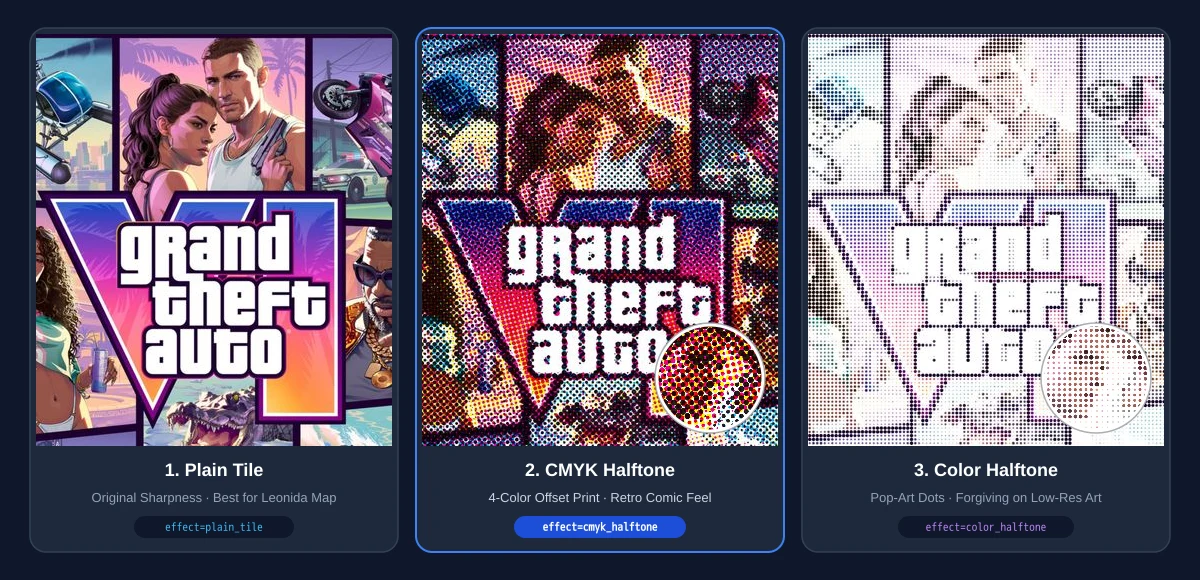
- Plain Tile (No Effect): Keeps every crisp line and tiny map label intact. Always choose this for the Leonida map or whenever you have a sharp high-res cover file.
- CMYK Halftone: Splits the image into classic 4-color cyan/magenta/yellow/black offset print screens. Because GTA's iconic cover art is bold and cel-shaded, CMYK halftone turns it into an authentic vintage magazine or screen-printed poster.
- Color Halftone: Converts tones into bold pop-art dot matrices. It is remarkably forgiving if your source is a lower-resolution 1080p game screenshot or fan wallpaper.
One-Click Presets (Open Ready to Upload)
Skip manual setup — click a preset below to open Rasterbator with recommended grid, aspect-safe framing (Contain), 8 mm overlap, crop marks, and page labels already turned on:
- Launch 3 × 4 Sharp Cover / Map Preset (Plain Tile) — 12 sheets, crisp detail, zero distortion
- Launch 3 × 4 Retro Comic Cover Preset (CMYK Halftone) — 12 sheets, classic 4-color offset dot style
- Launch 4 × 2 Wide Desk Skyline Preset (Plain Tile) — 8 sheets, ideal for 16:9 Vice City scenes
- Launch 4 × 5 Giant Leonida Map Preset (Plain Tile) — 20 sheets, maximum readability for map pins
Step 4: Print Settings & Seamless Assembly
Once you download the multi-page PDF (or individual JPG tiles in a ZIP), getting a clean, gap-free join comes down to three habits:
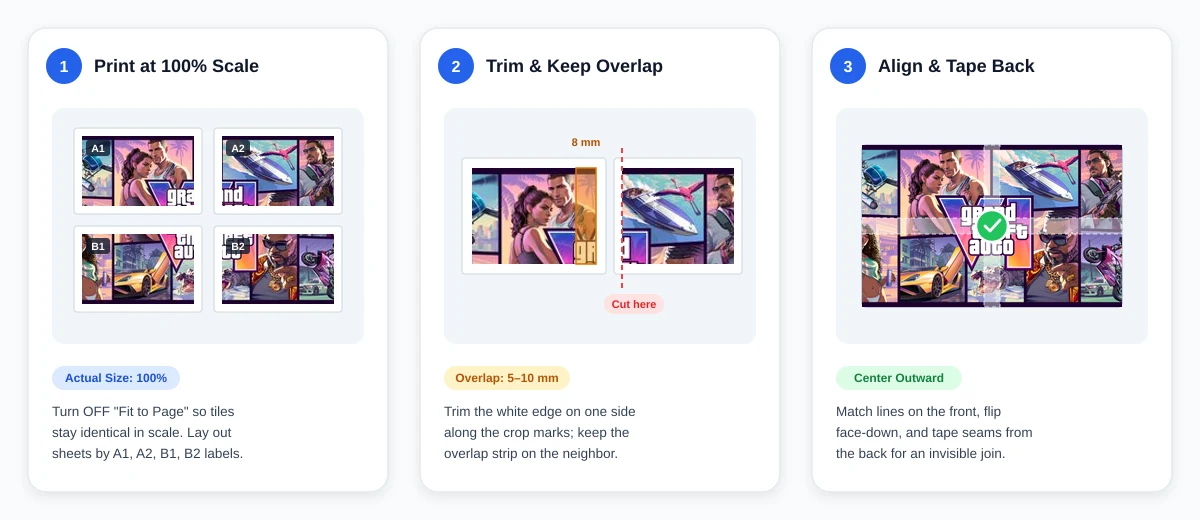
- Set Printer Scale to 100% (Actual Size): Never leave "Fit to Page" or "Shrink Oversized Pages" checked — it subtly shrinks individual tiles and breaks alignment across seams. Print page 1 first as a quick test.
- Use 120–160 gsm Matte Paper: Standard 80 gsm copy paper works, especially for halftone styles, but full-color GTA 6 artwork has heavy neon saturation. Heavier matte presentation paper prevents ink waviness and reduces glare under gaming LEDs.
- Trim One Edge, Overlap, and Tape from the Back: Keep the 8 mm overlap enabled in Step 5 of Rasterbator. Trim the white border off the overlapping edge using a metal ruler and craft knife, match the artwork lines on the front, then flip adjacent sheets face-down and tape along the back from the center outward.
- Mount Without Damaging Your Wall: Removable poster putty (Blu-Tack) or low-tack painter's tape keeps dorm and apartment walls clean. For more paper and ink troubleshooting, read our Printing Tips Guide or explore more styles in the Template Gallery.
Frequently Asked Questions
Can I print just one area of the Leonida map (like Vice City)?
Yes. Before opening the poster maker, upload the full map to our Image Cropper, select just the neighborhood or island you want, and send the cropped result straight into Rasterbator to blow it up across 6–12 sheets.
Why did my 45 MB official map file fail to upload?
Rasterbator caps individual uploads at 40 MB to keep browser memory smooth on laptops and phones. Simply open the image in our local Image Resizer (keep 100% scale or cap the long edge at 6000–8000 px) and re-save as JPG — the file drops to ~8–15 MB with virtually identical print sharpness.
Does Rasterbator upload my GTA 6 image to a server?
No. Main poster slicing, halftone rendering, and PDF/ZIP generation run completely inside your own browser using Web Workers, so your files never touch our servers.